A shopping mall records the same number of entries as three months ago. Yet the stores are complaining: fewer people are coming back. The aggregate figure tells a reassuring story. The right KPI, on the other hand, tells a different and more urgent one. Here are the Location Analytics KPIs that really make a difference, how to read them and what you should know before trusting them blindly.
What is Location Analytics (and why it's more than a map)
Every time someone walks into a store, an airport or a hospital, they leave a trace: where they stop, how long they stay, whether they’ve been there before. Location Analytics is the set of technologies that collect and interpret this trace, turning people’s physical presence into useful business information.
It’s not about knowing exactly where a person is at a given moment: that’s a different goal, and often one the most widespread technologies can’t even achieve. It’s about understanding how spaces are used: which areas get the most traffic, at what times, how often people come back. It’s the “where” dimension added to traditional Business Intelligence, and it’s precisely this addition that reveals patterns that sales or access data alone would never show.
Take a shopping mall that wants to understand why one wing of the building gets less foot traffic than the others: the answer isn’t in the checkout data, it’s in the movement data.
What's the difference between Location Analytics and Location Intelligence?
The two terms are often used almost as synonyms, but they aren’t the same. Location Analytics is operational: it captures what is happening now, or has happened recently, and turns it into measurable indicators. Location Intelligence looks further ahead: it cross-references location data with other sources, such as demographic or market data, to guide long-term strategic decisions, like where to open a new store.
In practice: the first answers “what is happening in my spaces today”, the second “where should I invest tomorrow”. Knowing the difference keeps you from expecting an operational dashboard to give answers that belong to a different kind of analysis.
The following sections focus specifically on the WiFi-based Location Analytics solution: how it collects data, which KPIs it delivers and where its accuracy ends.
How it works: technologies and data sources
There is no universally best location technology. WiFi, Bluetooth, RTLS, dedicated systems, GPS in outdoor spaces: each strikes its own balance between accuracy, cost, required infrastructure and how willing the tracked person is to “cooperate”, meaning installing an app, giving consent or carrying a dedicated device. The right choice always depends on the use case, not on the most sophisticated technology on paper.
Wi-Fi analytics: how the wireless signal becomes behavioral data
For most large-scale indoor scenarios (retail, airports, shopping malls), WiFi remains the most natural starting point, because it relies on a network that’s already in place. But the way WiFi generates useful data has changed quite a bit in recent years, and this is where it’s worth slowing down.
Historically, it was enough to pick up the signals emitted by nearby smartphones to estimate how many people were there, how long they stayed and whether they had been there before. Then Android and iOS introduced MAC address randomization: the identifier of each device’s WiFi card changes automatically, and the behavior varies from manufacturer to manufacturer. On iPhone, for example, the random address stays tied to a specific network for about two weeks before being regenerated. The practical result is that today, with passive WiFi listening alone, you get very little information that is truly reliable: the system can no longer assume that today’s device is the same as yesterday’s.
Things change when the user voluntarily connects to the network, typically through a Captive Portal, the welcome page that appears before you start browsing. There, the user logs in, accepts the terms and gives consent to data processing. From that moment on, the system has a verified identity and can recognize the same person on later visits, with no need to register again every time.
A further step up comes with Passpoint technology: after the first authentication, a profile is installed on the device that shifts recognition from the randomized identity to the device itself, and that can remain valid for months or years. From then on, every return visit is recognized automatically.
It’s worth being honest about one point: the positional accuracy you get with indoor WiFi roughly matches the radio coverage of a single access point, a margin of error of around 30-40 meters. Perfect for knowing whether a passenger is in the departures or arrivals area, or whether a visitor has entered a trade fair hall. Not enough to guide them step by step to a specific store: that requires a different technology, which is why VoiSmart’s indoor navigation (2Guide) relies on QR codes instead of asking WiFi for more than it can realistically deliver.

IoT and sensors: real-time asset and people tracking
When the use case changes (no longer understanding how visitors move, but tracking a specific asset in real time, such as a piece of medical equipment in a hospital or a pallet in a warehouse), other families of technologies come into play: RFID tags, dedicated IoT sensors, RTLS systems designed specifically for high-accuracy positioning.
These are more expensive solutions, and more invasive to install than WiFi, because they require their own infrastructure instead of relying on an existing network. They make sense when the required accuracy goes beyond what a WiFi cell can guarantee, or when the object to be tracked isn’t a smartphone but a dedicated device. For monitoring visitor flows, which is the core of WiFi-based Location Analytics, they remain the exception, not the rule.
The Location Analytics KPIs that really matter
Anyone who works with these platforms every day notices the same pattern: after the first few weeks of exploration, when people look at a bit of everything, customers end up coming back to the same two or three indicators. The dashboards with the most metrics aren’t the most used; in fact, the opposite is often true: fewer numbers, chosen well, beat twenty charts nobody opens anymore after the first month.
Dwell Time
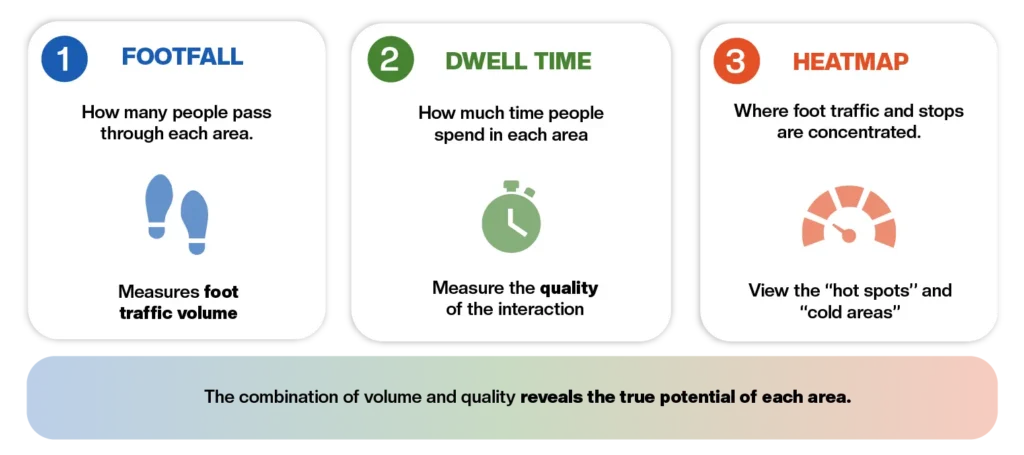
Dwell time is the average time a visitor spends in an area, and it’s one of the most frequently cited KPIs, rightly so, but with a caveat. The same number can mean opposite things depending on the context**:** in a shopping mall, a high dwell time is often a good sign, it indicates engagement; in an airport it may simply be natural, linked to waiting times before a flight; in a hospital, the exact same figure can signal queues that are too long. It should always be read in light of who generates it and where.
Return Rate
Knowing how many people have already been to a venue, and how many come back, tells you something that a simple entry count can’t. A shopping mall can have stable total traffic month after month and, at the same time, see its regular visitors decline: a sign of fading appeal that would go unnoticed by looking only at the raw number of entries. To be truly reliable, though, this KPI needs an identity that can be recognized over time, which is why it works better with active WiFi (Captive Portal, Passpoint) than with passive network listening alone.
Behavioral heatmap
The heatmap is probably the most immediate visualization tool: at a glance, it shows which areas are busiest and which stay empty. Its value, though, lies not so much in the image itself as in the comparison between different periods. A single heatmap is a snapshot; compared with last month’s, or with the same period of the previous year, it tells the story of how people’s behavior in the space is changing.
Footfall and spatial conversion rate
Footfall is, simply, how many people have passed through or visited an area in a given period: the starting point of any analysis, and probably the most requested number of all during a demo. On its own, though, it only tells half the story. The missing part is how many of those passes turn into something: entering a store, stopping, making a purchase. This is what the industry informally calls spatial conversion rate, the ratio between those who pass by and those who actually stop. Calculating it requires footfall data cross-referenced with other sources, typically sales or checkout visits, and it’s precisely in that cross-referencing that flow data turns into a business decision.
Path Analysis
Path analysis shows which areas are crossed most often, which sequences of zones repeat, which corners of a space are systematically ignored. It’s valuable information for anyone who has to decide where to place a display or how to redesign a layout. It should be used, however, for general readings of flows, not for pinpoint reconstructions of each individual’s path: accuracy always depends on the collection technology, and for WiFi the same margin of error mentioned above applies, a few tens of meters.
Zone transition Rate
A natural evolution of path analysis is understanding not only where people gather, but how they move from one zone to another: how many visitors entering area A go on to area B, and how many stop or turn back. At VoiSmart, this kind of reading falls under what is called flow analytics, the direction and density of movements between the different areas of a space. It’s a particularly useful indicator for measuring how well signage, physical or digital, guides people where they need to go.
There is no single most important KPI in absolute terms: it always depends on the goals of whoever is looking at it. An airport aims to increase the time spent in commercial areas; a shopping mall wants more returning visitors; a trade fair seeks a more balanced distribution across its halls. The truly useful question, during an evaluation, isn’t “how accurate is the positioning?” but what concrete decisions can be made with this data.
Practical examples by sector
- Retail and mass retail The most direct use of Location Analytics remains layout optimization: knowing which aisles are walked and which are ignored, how long people stop in front of a display, how the heatmap changes before and after a store refit. The same flow data, read by time slot, also helps decide when to open an extra checkout, before the queue forms rather than after. Retail is also a natural fit for proximity marketing as an additional layer, such as an offer sent while the customer is near a specific department, but it’s an extension of flow data, not the starting point.
- Airports and transport Here, Location Analytics works mainly on managing passenger flows at scale: understanding where congestion builds up, at what times, between which areas. Flow analytics, the analysis of movements between zones discussed above, makes it possible to spot bottlenecks near the gates earlier, and transit data between areas can guide where and when to update dynamic signage, so that it shows the smoothest route rather than the theoretical one. ADR Aeroporti di Roma has built part of its digital passenger journey on exactly this kind of data, collected via inPiazza WiFi.
- Healthcare (hospitals and local health authorities, ASL) An important technical distinction applies here, as already discussed: tracking specific medical assets (a piece of equipment, a mobile bed) requires dedicated technologies such as RFID or RTLS, not WiFi-based Location Analytics. What WiFi does well, on the other hand, is analyzing patient and visitor flows between wards, and monitoring the time spent in waiting rooms: a dwell time that keeps growing in a specific area, hour after hour, is a concrete indicator of where waiting times are getting longer, even before a complaint comes in. That said, the operational decision (adding staff, reorganizing a route) almost always remains with whoever manages the facility: the data supports the decision, rarely replaces it.
- Shopping centers (malls) Analyzing high- and low-attraction areas through heatmaps is the most immediate use case: which zones of the center work, which remain on the edges of the main flow. The same data, viewed before, during and after an in-store promotional campaign, becomes a concrete measure of its effectiveness: an increase in dwell time or footfall in a specific area during the campaign weeks is a more reliable signal than any after-the-fact estimate.
- Smart City and public administration The same logic extends to public spaces: squares, libraries and municipal offices with guest WiFi can be read with the same tools used in a shopping mall (footfall, peak hours, busiest areas) to understand how public spaces and services are actually used. It’s a natural extension of the same technology rather than an already widely documented case: the principle, however, remains identical to the one seen in the other sectors.
Location Analytics in Italian retail: a concrete use case
Imagine an Italian chain of about twenty stores that notices, quarter after quarter, the same overall incoming traffic but very different sales performance from one store to another. By cross-referencing footfall and dwell time by area, it emerges that in the underperforming stores customers linger near the entrance but rarely reach the back of the store, where the highest-margin products are displayed. The heatmap confirms the suspicion: a poorly placed display near the checkout “intercepts” attention before the customer moves on. Moving it, or redesigning the path, becomes a data-backed decision, not a category manager’s hunch.
Location Analytics and conversational AI: the emerging combination
Location data is no longer useful only to those looking at a dashboard: it is starting to directly power the experience of people who are physically in the space. Knowing which area a visitor is in makes it possible to trigger contextual notifications, such as a reminder, an alert or information that’s useful at that moment, offer proactive assistance before they even ask, or guide them physically to the destination they’re looking for. This is where Location Analytics stops being just a KPI dashboard and starts to resemble what could be called a multimodal Digital Concierge: on one side, immediate, very low-friction context identification (all it takes is to log in with WhatsApp at the Captive Portal, or scan a QR code at a specific point in the space, for the system to already know which area the user is in when the conversation opens); on the other, active intelligence, an AI chatbot, able to interpret the request in natural language and respond in a way that’s relevant to that context. In technical terms, this isn’t passive positioning, since it still requires a minimal action from the user, but it remains an immediate one: a login or a scan, not a complex registration.
AI chatbot and location data: how the Digital Concierge works
A passenger connects to an airport’s WiFi and opens a WhatsApp chat to ask where the nearest pharmacy is. In this scenario, three layers work in sequence: Location Analytics recognizes which area the passenger is in, with the typical accuracy of WiFi (enough to identify the zone, not the exact meter), and triggers the conversation; the AI chatbot understands the request and replies; if precise directions to the destination are needed, the QR-code indoor navigation system comes into play, guiding the user step by step to the exact spot. It is, after all, the same pattern that makes scenarios effective where guest WiFi, conversational assistant and indoor navigation work as a single experience for the passenger, rather than as disconnected systems.
Imagine a visitor who walks into a shopping mall and scans the QR code at the entrance (the same mechanism behind VoiSmart’s indoor navigation), finding a WhatsApp conversation already open in front of them. At that point, they can simply ask: “where is the electronics store?”. The system already knows, from the scan just made or from the link that started the conversation, where in the venue they are; the AI chatbot (OmniCloudCX) interprets the request and replies; and if precise directions to the destination are needed, the same conversation integrates with the QR-code indoor navigation system, which guides the visitor step by step. In this case, no WiFi registration is needed and no app has to be downloaded: just a scan and a question in natural language. It’s a detail that matters, especially in settings such as shopping malls, hospitals and trade fairs, where asking too much of first-time visitors creates more friction than value.
Privacy and GDPR: collecting location data compliantly
On the regulatory side too, the distinction between passive and active WiFi discussed above for technical reasons carries a lot of weight. In the passive scenario, because of MAC address randomization, the data collected is often a random identifier that changes over time: in most cases it doesn’t make it possible to trace back to a specific person, and precisely for this reason its analytical value, but also its legal value, is rather limited today.
In the active scenario, on the other hand, the Captive Portal collects data explicitly, with consent and in compliance with the GDPR: authentication data, consent to data processing, any marketing permissions, device language and WiFi session information. It’s a more solid approach, both technically and from a regulatory standpoint, because processing is based on informed consent from the very first contact.
The foundation of any compliant Location Analytics project remains the general principles of the GDPR: minimization of the data collected, anonymization or pseudonymization wherever possible, a clear distinction between aggregated data that can’t be traced back to an individual and individual data processed with explicit consent. VoiSmart operates with ISO 27001 certification for information security management, an element that carries particular weight in regulated settings such as healthcare and public administration.
The 4 types of analytics applied to Location Analytics
A useful way to gauge the maturity of a Location Analytics project is to distinguish between four levels of analysis. Descriptive analytics answers “what happened”: how many people visited an area yesterday. Diagnostic analytics answers “why did it happen”: why dwell time in an area dropped by 20% compared with the previous month. Predictive analytics tries to answer “what will happen”: forecasting the next peaks in attendance. Finally, prescriptive analytics suggests “what to do”: reallocating staff or changing a layout, based on the historical patterns observed.
In practice, most Location Analytics platforms available on the market today mainly cover the first two levels, descriptive and diagnostic, because they are the ones that most directly answer everyday operational questions. Predictive and prescriptive analytics remain the horizon the whole industry is moving toward, but they generally require integration with other company data sources and a longer-term analytical effort. And even when the technology gets to the point of suggesting an action, it is still up to the organization to interpret it and decide: the platform is a support tool, not a substitute for human judgment.
Frequently asked questions
We've collected the answers to our users' most frequently asked questions here.
What is meant by Location Analytics?
It's the practice of collecting and processing data tied to the physical location of people, objects or events, to extract useful business information from it. It adds the "where" dimension to traditional business analysis.
What are the 4 types of analytics?
Descriptive (what happened), diagnostic (why it happened), predictive (what will happen) and prescriptive (what to do). They all apply to Location Analytics, even though most projects today focus on the first two levels.
What is a concrete example of Location Analytics?
A shopping mall that uses WiFi to measure dwell time in each area, identifies the least visited zones through heatmaps, and optimizes the layout based on the observed paths.
Is Location Analytics worth investing in?
For venues with significant physical flows, such as retail, airports and shopping malls, the return is measurable when the data is read in the right context: layout optimization, a better understanding of visitors, decisions less based on gut feeling. The value depends on the volume of data available and on the quality of the existing collection infrastructure.
Location Analytics isn’t valuable for the amount of data it can produce, but for the quality of the decisions it makes possible. A dwell time, a heatmap or a return rate say little when read out of context; they say a lot when they’re tied to the real goals of whoever measures them, and when they’re collected with a technology whose limits are truly understood, not just its promised benefits.